
| New (23.12.2003) |
|
Deutsche Version können Sie hier finden. German version is available here. |
| Problem |
| Internet Explorer is vulnerable for URL Spoofing. You can find detailed information about these vulnerability at [1], [2], [3]. |
|
Solution (updated: 23.12.2003) |
|||||
|
The solution which I will describe below is not a patch. It is an approach to prevent the Internet Explorer running malicious URL addresses. This workaround is based on using filters which will be defined by PICSRules (s. [4]). PICSRules describe filtering rules that allow or block access to specified URLs. PICS means Platform for Internet Content Selection and is a standardized specification by W3C (s. [5]). As first step we need to write filtering rules to block the malicious URLs:
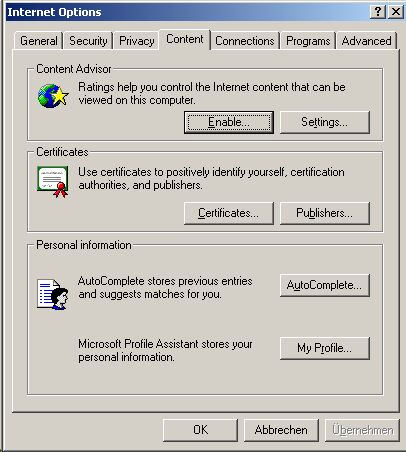
You can create it with any text editor or download here. Save it as workoaround.prf. There isn't any preferred location to save but we need the file later. The first Policy should block the malformed URLs. The second Policy allows all other URLs. The next step is to enable the Content Advisor in the Internet Explorer. You can do it as follows: 1. Select Tools -> Internet Options 2. Select Content tab and click to Enable button:
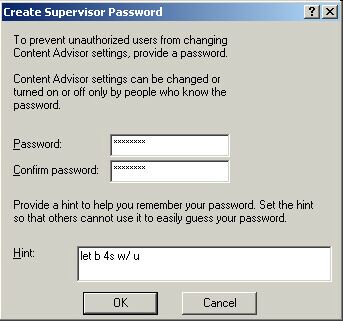
3. You get the Content Advisor window. After clicking OK you will be asked to give a Supervisor password. Please keep it safely! It will be asked everytime if you will change parameters of the Content Advisor.
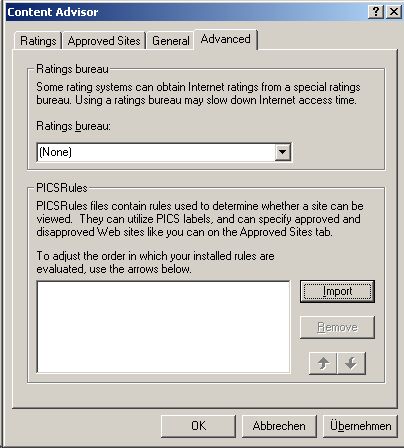
4. It is also recommended to give an hint to help you remember your password. Then click OK. We are now ready to read the rule file (workaround.prf) in the Internet Explorer. 1. Select Tools -> Internet Options 2. Select Content tab and click to Setup button. 3. You will be asked to give your Supervisor password. After clicking OK button you get the Content Advisor window:
4. Select Advanced tab -> Click Import button to load the workaround.prf file. 5. Click OK button After these steps the Internet Explorer should you ask everytime what to do if the URL is a spoofed URL. You can test it on [3], [6] or [7]. On the web site [7] you can see how a faked ebay site looks like. |
|||||
| Downloads | |
|
The filtering rules file
|
|
|
This document as PDF |
|
| This document as PDF in German | workaround-346948-GER.pdf |
| References |
|
[1]. http://www.securityfocus.com/archive/1/346948
[2]. http://www.heise.de/security/news/meldung/42768
[3]. http://security.openwares.org
[4]. http://www.w3.org/TR/REC-PICSRules
[5]. http://www.w3.org/PICS/
[6]. http://www.heise.de/security/dienste/browsercheck/demos/ie/e5_18.shtml
[7]. http://es-de-we.net/fake.htm
|
|
Copyright © 2003 by Önder
Örnek
|